
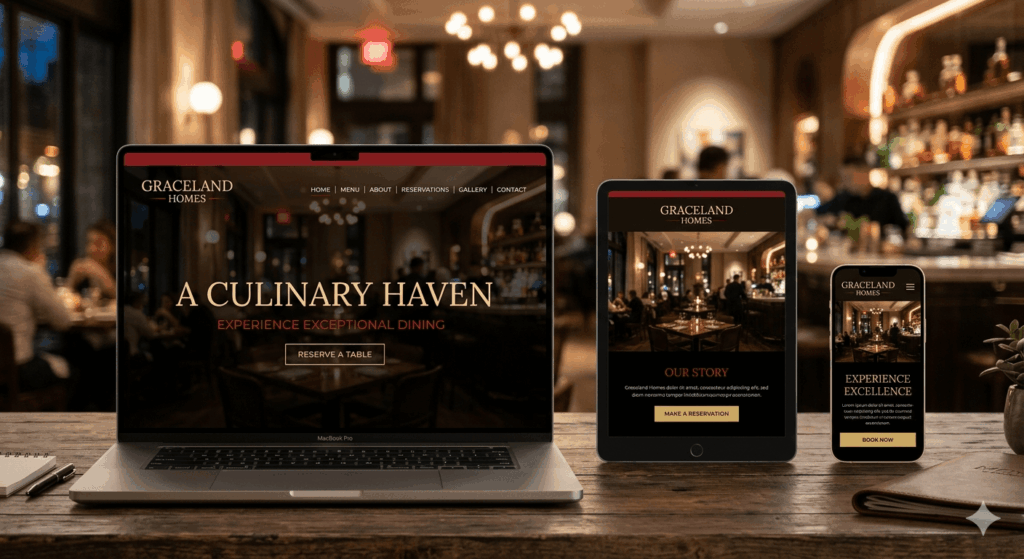
Building a restaurant website doesn’t have to mean wrestling with WordPress plugins or paying for a Squarespace subscription. In this tutorial, you’ll build a complete, production-ready restaurant website using nothing but semantic HTML5 and modern CSS — the kind of code that’s clean, fast, and genuinely impressive.
We’ll skip the @media queries entirely and use CSS Container Queries for a truly component-driven responsive layout. The menu gallery gets the Bento grid treatment — that chunky, editorial card-style layout made famous by Apple and every design portfolio in 2024. And the reservation form? It’s wired up to Formspree so it actually works without a single line of backend code. Whether you’re learning frontend fundamentals, building a portfolio project, or delivering a real client site, this tutorial walks you through every section, every selector, and every decision. No fluff. Just code that works.
Section 1: Project Overview & What We’re Building
This section introduces the project and ensures your development environment is ready. Our goal is to create a production-ready restaurant site that looks stunning on any screen size using CSS Container Queries instead of traditional media queries.
What You Will Build
The Code we’ll write in this tutorial will produce the following:
- Modern Tech Stack: Pure semantic HTML5 for SEO and accessibility.
- Modern CSS Layouts: A Bento-style menu gallery using CSS Grid.
- Functional Features: A smooth-scrolling navigation and a working reservation form powered by Formspree.
- Design Aesthetic: A “Glassmorphism” feel with fluid typography using clamp() and a warm, food-focused color palette.
To achieve the above, you’ll need the following Essential Tools:
- VS Code or Sublime Text is installed.
- The Live Server extension for real-time browser previews, if you’re using VS Code.
- A Formspree account for handling the reservation form.
The Starter Code (HTML Structure)
Copy and paste this into your index.html. This sets up the essential metadata and links your Google Fonts and stylesheet.
<!DOCTYPE html>
<html lang="en">
<head>
    <meta charset="UTF-8">
    <meta name="viewport" content="width=device-width, initial-scale=1.0">
    <title>Graceland Homes | Authentic Nigerian Cuisine</title>
    <link rel="preconnect" href="https://fonts.googleapis.com">
    <link rel="preconnect" href="https://fonts.gstatic.com" crossorigin>
    <link href="https://fonts.googleapis.com/css2?family=Inter:wght@400;500&family=Playfair+Display:wght@700&display=swap" rel="stylesheet">
    <link rel="stylesheet" href="style.css">
</head>
<body>

    <header>

    </header>
    <main>

    </main>
    <footer>

    </footer>

</body>
</html>
The Design System (CSS Variables)
Copy this into your style.css. We are using CSS Custom Properties (variables) to maintain a consistent design system for colors, spacing, and typography.
:root {
    /* Color Palette */
    --primary-gold: #D4AF37;
    --deep-red: #8B0000;
    --dark-bg: #1A1A1A;
    --glass-white: rgba(255, 255, 255, 0.1);
    --text-light: #F5F5F5;

    /* Typography */
    --font-heading: 'Playfair Display', serif;
    --font-body: 'Inter', sans-serif;

    /* Fluid Spacing & Sizing */
    --section-padding: clamp(2rem, 5vw, 5rem);
    --border-radius: 16px;
}

* {
    margin: 0;
    padding: 0;
    box-sizing: border-box;
}

html {
    scroll-behavior: smooth; /* Smooth scrolling for anchor links */
}

body {
    background-color: var(--dark-bg);
    color: var(--text-light);
    font-family: var(--font-body);
    line-height: 1.6;
}

h1, h2, h3 {
    font-family: var(--font-heading);
    color: var(--primary-gold);
}
Section 2: Setting Up the HTML Skeleton
This section defines the structural backbone of our site. Instead of using generic <div> tags, we use semantic HTML5 landmarks. This is essential because it tells search engines and screen readers exactly what each part of your page represents, boosting your SEO and accessibility.
What the Code we Write Here Produces
- Logical Landmarks: A clear division between the navigation (<header>), the main content (<main>), and the footer (<footer>).
- Accessibility Foundation: Proper language settings and viewport meta tags to ensure the site looks correct on mobile devices right out of the box.
The Code (HTML)
Add these landmark elements inside the <body> tag of the index.html file, replacing the previous body content.
<header>
<nav id="main-nav">
</nav>
</header>
<main>
<section id="home" class="hero-container">
</section>
</main>
<footer class="main-footer">
<p>© 2026 Graceland Homes. All Rights Reserved.</p>
</footer>
Section 3: The Hero Section
The Hero section is the first thing guests see. We want to make a bold statement with a full-screen background and a clear “Call to Action” (CTA) that encourages users to book a table immediately.
What the Code Here Produces
- Immersive Visuals: A high-quality background image that covers the entire screen using object-fit: cover.
- Direct Interaction: A prominent “Reserve a Table” button that smoothly scrolls the user down to the reservation form.
- Polished Entrance: A subtle CSS animation that fades and slides the text upward when the page loads.
The Code (HTML)
Copy and paste this HTML code inside the <section id=”home”> landmark we created in Section 2.
<div class="hero-content">
                <h1>Experience the Heart of Nigeria</h1>
                <p>Authentic flavors from Graceland Homes—where every meal feels like home.</p>
                <div class="hero-cta">
                    <a href="#reservations" class="btn-primary">Reserve a Table</a>
                    <a href="#menu" class="btn-secondary">View Menu</a>
                </div>
            </div>
The Code (CSS)
Add this to your style.css file. Note the use of clamp() for fluid typography that scales perfectly without media queries.
/* Hero Section Styling */
.hero-container {
    height: 100vh;
    display: flex;
    align-items: center;
    justify-content: center;
    text-align: center;
    background: linear-gradient(rgba(0,0,0,0.6), rgba(0,0,0,0.6)),
            image-set(
                url('images/hero-bg.avif') type('image/avif'),
                url('images/hero-bg.webp') type('image/webp'),
                url('images/hero-bg.jpg') type('image/jpeg')
            ) no-repeat center center / cover;

    padding: var(--section-padding);
}

.hero-content {
    animation: fadeInUp 1s ease-out; /* Section 3: Entrance animation */
}

.hero-content h1 {
    font-size: clamp(2.5rem, 8vw, 5rem); /* Fluid typography */
    margin-bottom: 1rem;
    line-height: 1.1;
    color: var(--text-light);
}
.hero-content em{
    color: var(--primary-gold);
}

.hero-content p {
    font-size: clamp(1rem, 2.5vw, 1.5rem);
    margin-bottom: 2.5rem;
    max-width: 700px;
    margin-inline: auto;
}

/* Buttons */
.btn-primary, .btn-secondary {
    display: inline-block;
    padding: 1rem 2rem;
    border-radius: 50px;
    text-decoration: none;
    font-weight: 500;
    transition: transform 0.3s ease, background 0.3s ease;
}

.btn-primary {
    background-color: var(--primary-gold);
    color: var(--dark-bg);
    margin-right: 1rem;
}

.btn-secondary {
    border: 2px solid var(--text-light);
    color: var(--text-light);
}

.btn-primary:hover {
    transform: translateY(-3px);
    background-color: #f0c541;
}

/* Entrance Animation */
@keyframes fadeInUp {
    from {
        opacity: 0;
        transform: translateY(30px);
    }
    to {
        opacity: 1;
        transform: translateY(0);
    }
}
Section 4: Navigation Bar (Modern CSS Popover)
In this section, we build a navigation bar that stays pinned to the top of the screen as you scroll. Instead of using complex JavaScript or the old “checkbox hack,” we are using the modern CSS Popover API and the <details>/<summary> elements to create a functional mobile menu.
What the Code Here Produces
- Sticky Navigation: The bar stays at the top of the viewport using position: sticky.
- Zero-JS Hamburger: We use the popover attribute to toggle the mobile menu and <details> for clean, accessible dropdown links.
- Separated Logic: A clean desktop layout that hides on small screens, and a dedicated mobile overlay.
The Code (HTML)
Add this HTML code inside the <header> tag we created in Section 2, replacing the previous one.
 <nav class="navbar">
            <div class="nav-content">
                <a href="index.html" class="logo">Graceland Homes</a>

                <!-- Desktop Navigation -->
                <ul class="nav-links desktop-only">
                    <li><a href="#home">Home</a></li>
                    <li><a href="#menu">Menu</a></li>
                    <li><a href="#about">About</a></li>
                    <li><a href="#reservations">Reservations</a></li>
                </ul>

                <!-- Mobile Navigation -->
                <details class="mobile-only nav-mobile">
                    <summary class="hamburger">
                        <!-- Hamburger icon -->
                        <span></span>
                        <span></span>
                        <span></span>
                    </summary>
                    <ul class="nav-links-mobile">
                        <li><a href="#home">Home</a></li>
                        <li><a href="#menu">Menu</a></li>
                        <li><a href="#about">About</a></li>
                        <li><a href="#reservations">Reservations</a></li>
                    </ul>
                </details>
            </div>
        </nav>
The Code (CSS)
Add the following styles to your style.css file.
/* The Navigation Bar CSS */

/* Sticky navbar */
.navbar {
  position: sticky;
  top: 0;
  z-index: 1000;
  background: #222;
  color: #fff;
  padding: 1rem 2rem;

  /* Enable container queries */
  container-type: inline-size;
  container-name: navbar;
}

.nav-content {
  display: flex;
  align-items: center;
  justify-content: space-between;
}

/* Logo on the left */
.logo {
  font-weight: bold;
  font-size: 1.2rem;
  color: #fff;
  text-decoration: none;
}

/* Desktop nav centered */
.desktop-only {
  flex: 1;
  display: flex;
  justify-content: center;
  gap: 2rem;
  list-style: none;
}

.desktop-only a {
  color: #fff;
  text-decoration: none;
  font-weight: 500;
  transition: color 0.3s ease;
}

.desktop-only a:hover {
  color: #f0a500;
}

/* Mobile nav hidden by default */
.mobile-only {
  display: none;
}

/* Hamburger icon */
.hamburger {
  cursor: pointer;
  display: flex;
  flex-direction: column;
  gap: 5px;
  width: 30px;
}

.hamburger span {
  display: block;
  height: 3px;
  background: #fff;
  border-radius: 2px;
}

/* Mobile nav links */
.nav-links-mobile {
  list-style: none;
  margin: 1rem 0 0;
  padding: 0;
  background: #333;
  border-radius: 8px;
}

.nav-links-mobile li {
  border-bottom: 1px solid #444;
}

.nav-links-mobile li:last-child {
  border-bottom: none;
}

.nav-links-mobile a {
  display: block;
  padding: 1rem;
  color: #fff;
  text-decoration: none;
}

.nav-links-mobile a:hover {
  background: #444;
  color: #f0a500;
}

/* ------------------------------
   Global viewport responsiveness
   ------------------------------ */
@media (max-width: 1024px) {
  .desktop-only {
    gap: 1rem;
  }
}

/* ------------------------------
   Component-level responsiveness
   ------------------------------ */
@container navbar (max-width: 768px) {
  .desktop-only {
    display: none;
  }
  .mobile-only {
    display: block;
  }
}
Section 5: The Menu Page (Bento Grid Gallery)
The Bento Grid is a modern layout style that organizes content into “chunky” editorial cards of varying sizes. We will use CSS Grid to create a 7-item gallery featuring your Nigerian specialties.
What this Code Produces
- Bento Layout: A visually interesting grid where some items (like the Jollof Rice) take up more space than others.
- Container Queries: The cards will automatically re-stack based on the size of their container, not the whole screen.
- Interactive Hover: Cards lift slightly when hovered to give a premium feel.
The Code (HTML)
Copy and paste the HTML code under the hero section within the main tag.
<section id="menu" class="menu-section">
            <h2 class="section-title">Our Cuisines</h2>
            <p class="info">Every dish is crafted with fresh, locally sourced ingredients and
            generations of culinary tradition.</p>
            <div class="bento-grid">
                <article class="menu-item featured">
                    <img src="images/nigerian-jollof.jpg" alt="Nigerian Jollof" loading="lazy">
                    <div class="item-info">
                        <h3>Nigerian Jollof</h3>
                        <p>The undisputed champion. Smoky, spicy, and perfectly seasoned.</p>
                        <span class="price">₦4,500</span>
                    </div>
                </article>

                <article class="menu-item">
                    <img src="images/egusi-soup.jpg" alt="Egusi Soup" loading="lazy">
                    <div class="item-info">
                        <h3>Egusi Soup</h3>
                        <p>Rich melon seed soup with pounded yam.</p>
                        <span class="price">₦5,000</span>
                    </div>
                </article>

                <article class="menu-item">
                    <img src="images/ghana-jollof.jpg" alt="Ghana Jollof" loading="lazy">
                    <div class="item-info">
                        <h3>Ghana Jollof</h3>
                        <p>A worthy contender. Basmati rice with a unique twist.</p>
                        <span class="price">₦4,200</span>
                    </div>
                </article>

                <article class="menu-item tall">
                    <img src="images/beef-suya.jpg" alt="Beef Suya" loading="lazy">
                    <div class="item-info">
                        <h3>Beef Suya</h3>
                        <p>Grilled spiced beef skewers, served with sliced onions, tomatoes, and our house yaji spice blend.</p>
                        <span class="price">₦5,500</span>
                    </div>
                </article>

                <article class="menu-item tall">
                    <img src="images/banga-soup.jpg" alt="Banga Soup" loading="lazy">
                    <div class="item-info">
                        <h3>Banga Soup</h3>
                        <p>Rich palm fruit extract simmered with dried fish, crayfish,
                and aromatic spices — a true Niger Delta classic.</p>
                        <span class="price">₦4,500</span>
                    </div>
                </article>

                <article class="menu-item tall">
                    <img src="images/pounded-yam.jpg" alt="Pounded Yam" loading="lazy">
                    <div class="item-info">
                        <h3>Pounded Yam with Okra</h3>
                        <p>Silky, hand-pounded yam paired with a rich okra draw soup and
                your choice of beef or seafood.</p>
                        <span class="price">₦6,500</span>
                    </div>
                </article>

                <article class="menu-item tall">
                    <img src="images/smoked-plantain.jpg" alt="smoked Plantain" loading="lazy">
                    <div class="item-info">
                        <h3>Smoked Plantain (Bole)</h3>
                        <p>Smoky, party-style plantain smoked over firewood with our
                signature blend of tomatoes, peppers, and secret spices.</p>
                        <span class="price">₦3,500</span>
                    </div>
                </article>

            </div>
        </section>
The Code (CSS)
Similarly, open style.css and add the following:
/* Styling for the Menu Section */

.menu-section {
    padding: var(--section-padding);
    container-type: inline-size; /* Enabling Container Queries */
}

.menu-section h2{
    text-align: center;
}

.info{
    text-align: center;
    padding: clamp(1rem, 4vw, 3rem);
}

.bento-grid {
    display: grid;
    gap: 1.5rem;
    grid-template-columns: repeat(4, 1fr);
    grid-auto-rows: 250px;
}

.menu-item {
    background: var(--glass-white);
    border-radius: var(--border-radius);
    overflow: hidden;
    position: relative;
    transition: transform 0.3s ease;
}

/* Overlay layer */
.menu-item::before {
    content: "";
    position: absolute;
    inset: 0; /* covers the whole item */
    background: rgba(0,0,0,0.4); /* semi-transparent black */
    z-index: 1; /* sits above the image */
}

.menu-item:hover {
   transform: translateY(-10px);
}

/* Bento Spanning */
.featured {
   grid-column: span 2;
   grid-row: span 2;
}

.tall {
  grid-row: span 2;
}

.menu-item img {
    width: 100%;
    height: 100%;
    object-fit: cover;
    display: block;
}

.item-info {
    position: absolute;
    bottom: 0;
    padding: 1.5rem;
    background: linear-gradient(transparent, rgba(0,0,0,0.8));
    width: 100%;
    z-index: 2; /* ensures text is above overlay */
}

/* Modern Container Query for responsiveness */
@container (max-width: 900px) {
    .bento-grid { grid-template-columns: repeat(2, 1fr); }
}

@container (max-width: 500px) {
    .bento-grid { grid-template-columns: 1fr; }
    .featured, .tall { grid-column: auto; grid-row: auto; }
}
Section 6: About / Story Section
This section moves away from the “sales” pitch of the menu and tells the story of Graceland Homes. We’ll use a two-column layout that intelligently stacks when space gets tight, thanks to container queries.
What the Code Produces
- Adaptive Layout: A side-by-side view (Text on the left, Image on the right) that automatically switches to a vertical stack on smaller screens.
- Editorial Styling: A decorative pull quote using the CSS ::before pseudo-element for a professional, magazine-like feel.
- Brand Narrative: Space to highlight the restaurant’s philosophy and its roots in authentic Nigerian flavors.
The Code (HTML)
Add the following code into the main tag of index.html, just after the menu section.
<section id="about" class="about-section">
            <div class="about-container">
                <div class="about-text">
                    <h2 class="section-title">Our Story</h2>
                    <p>Founded with a passion for bringing the vibrant tastes of Lagos and beyond to your table, Graceland Homes is more than just a restaurant—it's a home for food lovers.</p>
                    <blockquote class="chef-quote">
                        "We don't just cook; we preserve the heritage of Nigerian spice and soul."
                    </blockquote>
                    <p>From our signature smoky Nigerian Jollof to our rich Egusi soup, every dish is prepared with the finest local ingredients and a touch of grace.</p>
                </div>
                <div class="about-image">
                    <img src="images/pounded-yam.jpg" alt="Who we are" height="400" width="350" loading="lazy">
                </div>
            </div>
        </section>
The Code (CSS)
The following styles will be applied to the about section in style.css.
.about-section {
    padding: var(--section-padding);
    container-type: inline-size; /* Essential for container queries */
}

.about-container {
    display: grid;
    grid-template-columns: 1fr 1fr;
    gap: 3rem;
    align-items: center;
    max-width: 1200px;
    margin: 0 auto;
}

.chef-quote {
    position: relative;
    font-style: italic;
    font-size: 1.2rem;
    padding: 1.5rem 0;
    color: var(--primary-gold);
}

.chef-quote::before {
    content: "“";
    font-size: 4rem;
    position: absolute;
    top: -10px;
    left: -20px;
    opacity: 0.2;
}

.about-image img {
    width: 100%;
    border-radius: var(--border-radius);
    aspect-ratio: 4/5;
    object-fit: cover;
}

/* Container Query for Stacking Columns */
@container (max-width: 700px) {
    .about-container {
        grid-template-columns: 1fr;
    }

    .about-image {
        order: -1; /* Puts image on top when stacked */
    }
}
Section 7: Opening Hours
Clarity is key for restaurant visitors. We will use a semantic HTML <table> to display the hours, ensuring the data is organized and accessible for screen readers.
What the Code Produces
- Structured Data: A clean, readable table that aligns days and times perfectly.
- Tabular Alignment: We use the font-variant-numeric: tabular-nums CSS property to ensure numbers like “10:00” and “21:00” align vertically for better readability.
- Hover Highlights: Subtle row highlighting to help users track their eyes across the table.
The Code (HTML)
Now, copy and paste the following HTML inside the main tag under the about section of the index.html file.
<section id="hours" class="hours-section">
            <div class="hours-card">
                <h2 class="section-title">Opening Hours</h2>
                <table class="hours-table">
                    <tr>
                        <td>Monday - Thursday</td>
                        <td>10:00 AM - 09:00 PM</td>
                    </tr>
                    <tr class="highlight">
                        <td>Friday - Saturday</td>
                        <td>10:00 AM - 11:00 PM</td>
                    </tr>
                    <tr>
                        <td>Sunday</td>
                        <td>12:00 PM - 08:00 PM</td>
                    </tr>
                </table>
            </div>
        </section>
The Code (CSS)
Style the above hours section with the following CSS.
.hours-section {
    padding: var(--section-padding);
    display: flex;
    justify-content: center;
}

.hours-card {
    background: var(--glass-white);
    padding: 2.5rem;
    border-radius: var(--border-radius);
    border: 1px solid rgba(255, 255, 255, 0.05);
    width: 100%;
    max-width: 600px;
}

.hours-table {
    width: 100%;
    border-collapse: collapse;
    font-variant-numeric: tabular-nums; /* Keeps numbers aligned */
}

.hours-table td {
    padding: 1rem 0;
    border-bottom: 1px solid rgba(255, 255, 255, 0.1);
}

.hours-table td:last-child {
    text-align: right;
    color: var(--primary-gold);
    font-weight: 500;
}

.hours-table tr:hover {
    background: rgba(212, 175, 55, 0.05);
}

.highlight {
    color: var(--text-light);
    font-weight: bold;
    background: rgba(212, 175, 55, 0.05);
}
Section 8: Reservation Form (Formspree Integration)
In this section, we create a functional reservation form for Graceland Homes. We will use Formspree, which allows you to receive form submissions directly in your email without writing any backend code. We will also use HTML5 validation to ensure users provide the correct information before hitting submit.
What the Code Produces
- Functional Connectivity: A form that actually works using the Formspree endpoint.
- Modern Inputs: Custom-styled form fields with focus effects for a premium feel.
- Accessibility: Proper use of <label> and aria-label to ensure the form is usable for everyone.
The Code (HTML)
Copy and paste this HTML code under the hours section inside the main tag. If you do not have a Formspree account, create one, and replace your_endpoint in the form’s action attribute with your actual Formspree ID.
 <section id="reservations" class="reservation-section">
            <div class="form-card">
                <h2 class="section-title">Book a Table</h2>
                <form action="https://formspree.io/f/your_endpoint" method="POST" class="res-form">
                    <div class="form-group">
                        <label for="name">Full Name</label>
                        <input type="text" id="name" name="name" placeholder="Kelechi OK" required>
                    </div>
                    <div class="form-group">
                        <label for="email">Email Address</label>
                        <input type="email" id="email" name="email" required>
                    </div>
                    <div class="form-row">
                        <div class="form-group">
                            <label for="date">Date</label>
                            <input type="date" id="date" name="date" required>
                        </div>
                        <div class="form-group">
                            <label for="guests">Guests</label>
                            <input type="number" id="guests" name="guests" min="1" max="20" value="2">
                        </div>
                    </div>
                    <div class="form-group">
                        <label for="message">Special Requests (Optional)</label>
                        <textarea id="message" name="message" rows="4"></textarea>
                    </div>
                    <button type="submit" class="btn-primary">Confirm Reservation</button>
                </form>
            </div>
        </section>
The Code (CSS)
Apply the following CSS to the reservation form created above.
.reservation-section {
    padding: var(--section-padding);
    background: var(--dark-bg);
}

.form-card {
    max-width: 800px;
    margin: 0 auto;
    background: var(--glass-white);
    padding: clamp(1.5rem, 5vw, 3rem);
    border-radius: var(--border-radius);
}

.res-form {
    display: flex;
    flex-direction: column;
    gap: 1.5rem;
}

.form-group {
    display: flex;
    flex-direction: column;
    gap: 0.5rem;
}

.form-row {
    display: grid;
    grid-template-columns: 1fr 1fr;
    gap: 1rem;
}

input, textarea {
    background: rgba(255, 255, 255, 0.05);
    border: 1px solid rgba(255, 255, 255, 0.1);
    padding: 1rem;
    color: white;
    border-radius: 8px;
    font-family: inherit;
}

input:focus {
    outline: none;
    border-color: var(--primary-gold);
}

@container (max-width: 500px) {
    .form-row { grid-template-columns: 1fr; }
}
Section 9: Contact & Location
The final section provides the essential “where and how” for your customers. We use the semantic <address> element for the restaurant’s details and an embedded map for easy navigation.
What the Code Produces
- Semantic Contact: Uses the <address> tag, which is the standard for contact information.
- Interactive Maps: A responsive Google Maps embed that lets users see exactly where Graceland Homes is located.
- Quick Actions: Tap-to-call and tap-to-email links that work instantly on mobile devices.
The Code (HTML)
 <section id="contact" class="contact-section">
            <div class="contact-grid">
                <div class="contact-info">
                    <h2 class="section-title">Visit Us</h2>
                    <address>
                        <p><strong>Location:</strong> 123 Victory Estate, Lekki Phase 1, Lagos, Nigeria</p>
                        <p><strong>Phone:</strong> <a href="tel:+2348000000000">+234 800 000 0000</a></p>
                        <p><strong>Email:</strong> <a href="mailto:hello@gracelandhomes.com">hello@gracelandhomes.com</a></p>
                    </address>
                    <div class="social-links">
                        <span>Follow us on Instagram & X</span>
                    </div>
                </div>
                <div class="map-container">
                    <iframe
                        src="https://www.google.com/maps/embed?pb=!1m18!1m12!1m3!1d126844.063486015!2d3.333333!3d6.524379!2m3!1f0!2f0!3f0!3m2!1i1024!2i768!4f13.1!3m3!1m2!1s0x103b8b2ae68280c1%3A0xdc9e8db07c35a1f!2sLagos!5e0!3m2!1sen!2sng!4v1710000000000!5m2!1sen!2sng"
                        width="100%" height="350" style="border:0; border-radius: 16px;" allowfullscreen="" loading="lazy">
                    </iframe>
                </div>
            </div>
        </section>
The Code (CSS)
Apply this CSS to the contact information section.
.contact-section {
    padding: var(--section-padding);
    container-type: inline-size;
}

.contact-grid {
    display: grid;
    grid-template-columns: 1fr 1.5fr;
    gap: 3rem;
    max-width: 1200px;
    margin: 0 auto;
    align-items: center;
}

address {
    font-style: normal;
    display: flex;
    flex-direction: column;
    gap: 1rem;
    font-size: 1.1rem;
}

address a {
    color: var(--primary-gold);
    text-decoration: none;
}

@container (max-width: 800px) {
    .contact-grid {
        grid-template-columns: 1fr;
    }
}
Section 10: Footer
The footer is the final touchpoint of the Graceland Homes experience. It reinforces the brand identity, provides easy navigation, and offers a smooth way for users to return to the top of the page.
What the Code Produces includes:
- Brand Consistency: Re-states the restaurant name and mission in a minimal, elegant layout.
- Social Connectivity: Semantic links to your social profiles using modern layout techniques.
- User Experience: A “Back to Top” button that utilizes the scroll-behavior: smooth logic defined earlier.
The Code (HTML)
Here is the HTML code we used to build the footer section. Copy and paste into the index.html file. Visit Icon8 and download SVG or PNG images of your preferred social icons, then save them in the assets folder.
<footer class="main-footer">
<div class="footer-grid">
<div class="footer-brand">
<h3>Graceland Homes</h3>
<p>Bringing the authentic taste of Nigeria to your neighborhood.</p>
</div>
<div class="footer-nav">
<h4>Quick Links</h4>
<ul>
<li><a href="#home">Home</a></li>
<li><a href="#menu">Menu</a></li>
<li><a href="#about">Our Story</a></li>
<li><a href="#reservations">Book a Table</a></li>
</ul>
</div>
<div class="footer-social">
<h4>Follow Our Journey</h4>
<div class="social-icons">
<a href="https://facebook.com/"><img src="assets/facebook.svg" alt="Facebook" width="36" height="36"></a>
<a href="https://x.com"><img src="assets/twitter.svg" alt="Twitter" width="36" height="36"></a>
<a href="https://instagram.com"><img src="assets/instagram.svg" alt="Instagram" width="36" height="36"></a>
<a href="https://linkedin.com"><img src="assets/linkedin.svg" alt="linkedin" width="36" height="36"></a>
</div>
</div>
</div>
<div class="footer-bottom">
<p>© 2026 Graceland Homes. All Rights Reserved.</p>
<a href="#home" class="back-to-top">↑ Back to Top</a>
</div>
</footer>
The Code (CSS)
This is the CSS code we used to structure our footer section to make it look elegant. Add them to the style.css file.
.main-footer {
    background: #111;
    padding: 4rem 2rem 2rem;
    border-top: 1px solid var(--glass-white);
}

.footer-grid {
    display: grid;
    grid-template-columns: repeat(auto-fit, minmax(250px, 1fr));
    gap: 3rem;
    max-width: 1200px;
    margin: 0 auto;
}

.footer-nav ul {
    list-style: none;
    margin-top: 1rem;
}

.footer-nav a {
    color: var(--text-light);
    text-decoration: none;
    line-height: 2;
    opacity: 0.8;
}

.social-icons {
    display: flex;
    gap: 1rem;
    margin-top: 1rem;
}

.footer-bottom {
    margin-top: 4rem;
    padding-top: 2rem;
    border-top: 1px solid rgba(255,255,255,0.05);
    display: flex;
    justify-content: space-between;
    align-items: center;
    font-size: 0.9rem;
}

.back-to-top {
    color: var(--primary-gold);
    text-decoration: none;
    font-weight: bold;
}
Section 11: CSS Architecture & Modern Techniques (Deep Dive)
This project stands out because it uses “Future CSS” – techniques that make your code more maintainable and performant. Some of the modern CSS used in this project include:
1. CSS Custom Properties (Variables)
- What: This was used to store values like ‘–primary-gold’ in the :root.
- Why: With variables, instead of hunting for hex codes, we can change one variable to update the whole site’s theme.
- When: We can use them for colors, spacing, and fonts at the start of every project.
2. Cascade Layers (@layer)
- What: Though we did not use this in this project, it’s a way to group CSS into “importance” levels.
- Why: It solves the “specificity war.” You can put “reset” styles in one layer and “components” in another, ensuring your component styles always win without using !important in your CSS block.
- How: Wrap code in @layer{} for reset, base, or components.
3. Container Queries (@container)
- What: Styling an element based on the size of its parent, not the whole screen.
- Why: In a Bento grid, a “Menu Card” might be small on a desktop sidebar but large on a mobile screen. Container queries allow the card to decide its own layout based on the space it is given.
- When: Use this for reusable components like the Menu items or About sections.
4. Fluid Typography (clamp())
- What: We achieve fluid typography using ‘font-size: clamp(min, preferred, max).’
- Why: It replaces multiple media queries. The text grows smoothly as the screen widens, staying within a safe range.
- When: Use for h1 headings and body text to ensure readability on all devices.
5. Grid + Subgrid
- What: display: grid with grid-template-rows: subgrid.
- Why: It allows children of a grid item to align with the parent’s grid lines.
- How: This ensures that if one “Jollof Rice” card has a longer description, the prices in all cards still line up perfectly at the bottom.
6. Focus Visibility (:focus-visible)
- What: A pseudo-class that shows a focus ring only when needed.
- Why: Mouse users don’t usually want to see a box around a button after clicking it, but keyboard users need it for accessibility.
- When: Always use this to keep your site accessible and visually clean.
Section 12: Deployment
Once your code is ready, it’s time to take Graceland Homes from your local machine to the global web. Since we built this using pure HTML and CSS without a complex backend, we can take advantage of high-speed, free hosting.
Option 1: GitHub Pages (Best for Portfolios)
GitHub Pages is the industry standard for hosting static sites directly from your code repository.
The Process:
First create a new repository on GitHub, upload your base folder which contains the index.html, style.css, images, and assets/ folder.
Open the repository and go to Settings. From the settings window, enable “Pages”.
Why use GitHub Pages:
GitHub is free, and provides a professional github.io URL, and automatically updates every time you push new code to the repo.
Option 2: Vercel (Best for Performance)
Vercel offers an incredibly fast global edge network, making your site load instantly for users in Nigeria or anywhere else.
The Process:
Connect your GitHub account to Vercel and import your desired repository from the account to the Vercel dashboard.
Why use Vercel:
It automatically optimizes your headers and provides an SSL certificate (HTTPS) out of the box for security.
Final Lighthouse Performance Checklist
Before handing the site over to a client or adding it to your portfolio, you should run a Lighthouse audit (found in Chrome DevTools) to ensure the site is elite.
- Performance: Check that your images (like the Jollof Rice gallery) are compressed and saved in modern formats like AVIF and WebP to keep load times under 2 seconds.
- Accessibility: Ensure all images have alt text (e.g., alt=”Spicy Beef Suya”) and that your :focus-visible rings are working for keyboard navigation.
- Best Practices: Verify that you are using HTTPS and that your semantic HTML landmarks (<main>, <nav>, <address>) are properly nested.
- SEO: Confirm your <title> includes keywords like “Nigerian Cuisine” and that your meta-description is enticing for search results.
Conclusion
You’ve now built a high-performance, modern restaurant website for Graceland Homes using the absolute best practices in frontend development. By sticking to semantic HTML and cutting-edge CSS, you’ve ensured this site is fast, accessible, and ready for any device.
Building a restaurant website doesn’t have to mean wrestling with heavy plugins or expensive subscriptions. By mastering semantic HTML and modern techniques like Container Queries and CSS Grid, you gain full control over your code and your performance.
Graceland Homes is now live, featuring:
- A responsive Bento Grid menu gallery.
- A zero-JS mobile menu using the Popover API.
- A functional reservation system via Formspree.
Whether you’re delivering this to a real client or using it to level up your frontend skills, you’ve proven that ‘Just Vibes’ and clean code are all you need to build something amazing.
Before you go, do not forget to comment and share this post. Tell me what you would love to see me build next.
