
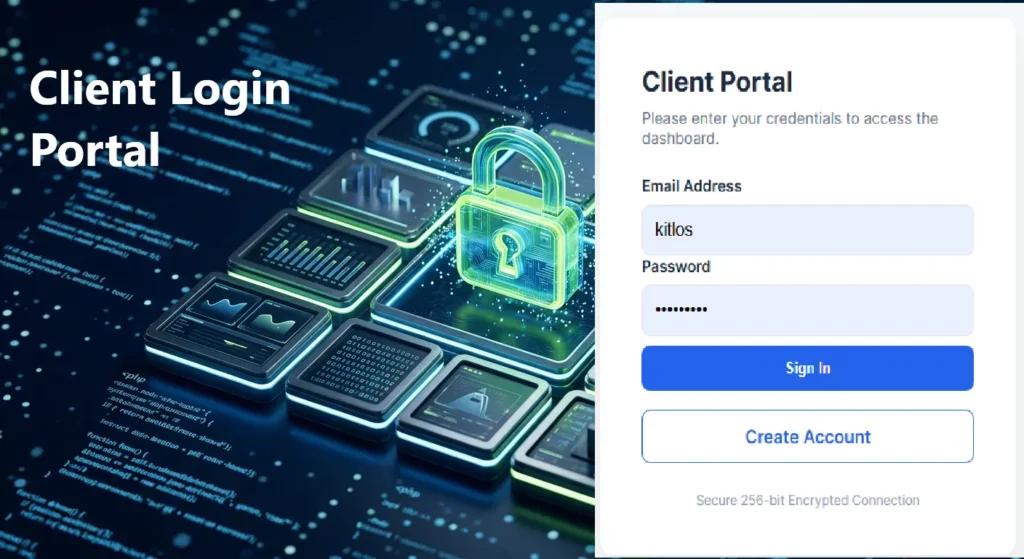
Frameworks are fast, but they are also ‘Black Boxes.’ In this tutorial, we strip away the bloat to build a functional, professional-grade Client Login Portal from the ground up. From Argon2id password security to Double Opt-In email verification, discover why ‘Vanilla’ is the ultimate choice for developers who prioritize security and performance in 2026.
Project Overview
In this tutorial, we built a professional-grade, zero-dependency authentication system. This version implements Double Opt-In, requiring users to verify their email address before accessing the secure dashboard.
Prerequisites
If you wish to follow through with this tutorial, you need the following:
- PHP 8.2+: For Argon2id and modern session handling.
- Database: MySQL / MariaDB.
- SMTP Access: To send real emails, you must configure a mail server or use a library like PHPMailer in actions/register_process.php. You can implement this when you go live.
- SSL/HTTPS: Recommended for session security.
- Building a Professional Homepage with Only HTML & CSS
- Deploying a Production Business Website for Free — No Frameworks
- Build a Modern Portfolio Landing Page (No Frameworks)
Create the Project Structure Directory
After the installation of XAMP, open C:/xamp/Htdocs, and create the following directory and file structure. You can use VS Code or Sublime Text for coding.
/client-portal
│
├── /includes
│   ├── db_connect.php     (Database connection)
│   ├── functions.php      (Sanitization & Validation)
│   ├── init.php           (Secure Session Settings)
│   ├── auth_guard.php     (The "Middleware" protector)
│
├── /actions
│   ├── login_process.php  (Login verification logic)
│   ├── register_process.php (User creation logic)
│   ├── logout.php         (Session destruction)
│   ├── verify.php           (Handles Email Link Clicks)
│
├── index.php              (The Login UI)
├── register.php           (Registration UI)
├── style.css              (The Bento-Grid Styling)
├── dashboard.php     (The Protected Client Area)
└── schema.sql             (Database Setup Script)
└── info.php               (messages & Error prompts)
Set up the Project
Use your preferred text editor or IDE to write relevant code for each of the files created above. Below is the required code for each file; copy and paste accordingly.
/Includes
Insert the following into db_connect.php file.
<?php
// Secure Database Configuration
$host = 'localhost';
$db   = 'client_portal_db'; //The database name
$user = 'root'; // Use a dedicated user, not 'root' in live server, but root in XAMP
$pass = ''; // Use dedicated password, but leave empty in XAMP
$charset = 'utf8mb4';

$dsn = "mysql:host=$host;dbname=$db;charset=$charset";

$options = [
    PDO::ATTR_ERRMODE            => PDO::ERRMODE_EXCEPTION, // Throw exceptions on error
    PDO::ATTR_DEFAULT_FETCH_MODE => PDO::FETCH_ASSOC,       // Return data as associative arrays
    PDO::ATTR_EMULATE_PREPARES   => false,                  // Use real prepared statements
];

try {
     $pdo = new PDO($dsn, $user, $pass, $options);
} catch (\PDOException $e) {
     // Log the error privately, show a generic message to the user
     error_log($e->getMessage());
     exit("A system error occurred. Please try again later.");
}

Insert the following into functions.php
<?php
/**
 * Cleanse input to prevent XSS and malformed data
 */
function sanitize_input($data) {
    $data = trim($data);
    $data = stripslashes($data);
    $data = htmlspecialchars($data, ENT_QUOTES, 'UTF-8');
    return $data;
}

/**
 * Validate email format strictly
 */
function is_valid_email($email) {
    return filter_var($email, FILTER_VALIDATE_EMAIL);
}
Add the following into the init.php file.
<?php
// Secure Session Configuration
$session_name = 'secure_client_session';
$secure = true;    // Set to false if not using HTTPS (not recommended)
$httponly = true;  // Prevents JavaScript from accessing the session ID
$samesite = 'Strict'; // Prevents CSRF by not sending cookies on cross-site requests

session_set_cookie_params([
    'lifetime' => 0, // Expire when browser closes
    'path' => '/',
    'domain' => $_SERVER['HTTP_HOST'],
    'secure' => $secure,
    'httponly' => $httponly,
    'samesite' => $samesite
]);

session_name($session_name);
session_start();

Add into auth_guard.php
<?php
require_once 'init.php'; // Contains the session_start logic above

function check_auth() {
    // 1. Check if the user ID exists in the session
    if (!isset($_SESSION['user_id'])) {
        header("Location: login.php?error=unauthorized");
        exit;
    }

    // 2. Session Timeout (Optional but recommended - 30 mins)
    $timeout_duration = 1800;
    if (isset($_SESSION['last_activity']) && (time() - $_SESSION['last_activity']) > $timeout_duration) {
        session_unset();
        session_destroy();
        header("Location: login.php?error=timeout");
        exit;
    }

    $_SESSION['last_activity'] = time(); // Update activity timestamp
}

/Actions
Insert the following code into login_process.php
<?php
session_start();
require 'db_connect.php';

if ($_SERVER["REQUEST_METHOD"] == "POST") {
    $email = $_POST['email'];
    $password = $_POST['password'];

    // 1. Fetch the user record
    $stmt = $pdo->prepare("SELECT id, password_hash FROM users WHERE email = ?");
    $stmt->execute([$email]);
    $user = $stmt->fetch();

    // 2. The Verification Loop
    if ($user && password_verify($password, $user['password_hash'])) {

        // Check if account is activated
        if ($user['is_active'] == 0) {
            header("Location: ../info.php?error=not_activated");
            exit;
        }
        // Success: Regenerate session ID to prevent session fixation
        session_regenerate_id(true);
        $_SESSION['user_id'] = $user['id'];
        $_SESSION['last_login_time'] = time();

        header("Location: ../dashboard.php");
        exit;
    } else {
        // Security Tip: Use generic error messages to prevent user enumeration
        exit("Invalid email or password.");
    }
}

Add this to register_process.php
<?php
require_once '../includes/db_connect.php';
require_once '../includes/functions.php';

if ($_SERVER["REQUEST_METHOD"] == "POST") {
    $email = filter_var($_POST['email'], FILTER_SANITIZE_EMAIL);
    $password = $_POST['password'];
    $full_name = sanitize_input($_POST['full_name']);

    // 1. Generate Secure Activation Token
    $token = bin2hex(random_bytes(32));
    $expires = date('Y-m-d H:i:s', strtotime('+24 hours'));

    // 2. Hash Password (Argon2id)
    $options = ['memory_cost' => 65536, 'time_cost' => 4, 'threads' => 2];
    $hashed_password = password_hash($password, PASSWORD_ARGON2ID, $options);

    // 3. Insert User as "Inactive"
    $sql = "INSERT INTO users (full_name, email, password_hash, activation_token, token_expires)
            VALUES (:name, :email, :pass, :token, :expires)";

    $stmt = $pdo->prepare($sql);

    try {
        $stmt->execute([
            'name' => $full_name,
            'email' => $email,
            'pass' => $hashed_password,
            'token' => $token,
            'expires' => $expires
        ]);

        // 4. Send Verification Email
        $activation_link = "https://yourdomain.com/actions/verify.php?token=$token";
        $subject = "Activate Your Client Portal Account";
        $message = "Hello $full_name, please click here to verify your account: $activation_link";

        // In a real production app, use PHPMailer or an API like SendGrid
        mail($email, $subject, $message, "From: noreply@yourdomain.com");

        header("Location: ../info.php?status=registered");
    } catch (PDOException $e) {
        exit("Registration failed. Email may already exist.");
    }
}

Copy and paste the code into logout.php
<?php
include 'init.php';

// 1. Clear all session variables
$_SESSION = array();

// 2. Delete the actual cookie from the browser
if (ini_get("session.use_cookies")) {
    $params = session_get_cookie_params();
    setcookie(session_name(), '', time() - 42000,
        $params["path"], $params["domain"],
        $params["secure"], $params["httponly"]
    );
}

// 3. Destroy the session on the server
session_destroy();

// 4. Redirect to login
header("Location: ../info.php?message=logged_out");
exit;
Insert into verify.php file.
<?php
require_once '../includes/db_connect.php';

if (isset($_GET['token'])) {
    $token = $_GET['token'];

    // Find user with this token who hasn't expired yet
    $stmt = $pdo->prepare("SELECT id FROM users WHERE activation_token = ? AND token_expires > NOW() AND is_active = 0");
    $stmt->execute([$token]);
    $user = $stmt->fetch();

    if ($user) {
        // Activate account and clear token
        $update = $pdo->prepare("UPDATE users SET is_active = 1, activation_token = NULL, token_expires = NULL WHERE id = ?");
        $update->execute([$user['id']]);

        header("Location: ../index.php?status=activated");
    } else {
        exit("Invalid or expired activation link.");
    }
}

/Client -portal: Base folder
The following code should be added to the index.php file.
<?php
 require_once 'includes/init.php';
?>
<!DOCTYPE html>
<html lang="en">
<head>
    <meta charset="UTF-8">
    <meta name="viewport" content="width=device-width, initial-scale=1.0">
    <title>Secure Client Portal | Login</title>
    <link rel="stylesheet" href="style.css">
</head>
<body>
    <main class="login-container">
        <section class="login-card">
            <header>
                <h1>Client Portal</h1>
                <p>Please enter your credentials to access the dashboard.</p>
            </header>

            <form action="actions/login_process.php" method="POST" class="login-form">
                <div class="input-group">
                    <label for="email">Email Address</label>
                    <input type="email" id="email" name="email" required placeholder="name@company.com">
                </div>

                <div class="input-group">
                    <label for="password">Password</label>
                    <input type="password" id="password" name="password" required placeholder="••••••••">
                </div>

                <button type="submit" class="btn-primary">Sign In</button>
                    <a href="register.php" class="btn-secondary">Create Account</a>
            </form>

            <footer>
                <p>Secure 256-bit Encrypted Connection</p>
            </footer>
        </section>
    </main>
</body>
</html>

Add the following to the register.php file
<?php
require_once 'includes/init.php';
?>
<!DOCTYPE html>
<html lang="en">
<head>
    <meta charset="UTF-8">
    <meta name="viewport" content="width=device-width, initial-scale=1.0">
    <title>Secure Client Portal | Register</title>
    <link rel="stylesheet" href="style.css">
</head>
<body>
    <main class="login-container">
        <section class="login-card">
            <header>
                <h1>Create Account</h1>
                <p>Fill in your details to register for the client portal.</p>
            </header>

            <form action="actions/register_process.php" method="POST" class="login-form">
                <div class="input-group">
                    <label for="name">Full Name</label>
                    <input type="text" id="full_name" name="full_name" required placeholder="John Doe">
                </div>

                <div class="input-group">
                    <label for="email">Email Address</label>
                    <input type="email" id="email" name="email" required placeholder="name@company.com">
                </div>

                <div class="input-group">
                    <label for="password">Password</label>
                    <input type="password" id="password" name="password" required placeholder="••••••••">
                </div>

                <div class="input-group">
                    <label for="confirm_password">Confirm Password</label>
                    <input type="password" id="confirm_password" name="confirm_password" required placeholder="••••••••">
                </div>

                <button type="submit" class="btn-primary">Register</button>

                <!-- Back to login -->
                <a href="index.php" class="btn-secondary">Back to Login</a>
            </form>

            <footer>
                <p>Secure 256-bit Encrypted Connection</p>
            </footer>
        </section>
    </main>
</body>
</html>

Add to style.css
:root {
    --bg-color: #f4f7f9;
    --card-bg: #ffffff;
    --primary-accent: #2563eb;
    --text-main: #1e293b;
    --border-radius: 12px;
}

* {
    box-sizing: border-box;
    margin: 0;
    padding: 0;
}

body {
    font-family: 'Inter', system-ui, sans-serif;
    background-color: var(--bg-color);
    display: flex;
    justify-content: center;
    align-items: center;
    min-height: 100vh;
    color: var(--text-main);
}

.login-card {
    background: var(--card-bg);
    padding: 2.5rem;
    border-radius: var(--border-radius);
    box-shadow: 0 10px 25px -5px rgba(0, 0, 0, 0.1);
    width: 100%;
    max-width: 400px;
    display: grid;
    gap: 1.5rem;
}

header h1 {
    font-size: 1.5rem;
    margin-bottom: 0.5rem;
}

header p {
    font-size: 0.875rem;
    color: #64748b;
}

.input-group {
    display: grid;
    gap: 0.5rem;
}

label {
    font-size: 0.875rem;
    font-weight: 600;
}

input {
    padding: 0.75rem;
    border: 1px solid #e2e8f0;
    border-radius: 8px;
    font-size: 1rem;
    transition: border-color 0.2s;
}

input:focus {
    outline: none;
    border-color: var(--primary-accent);
    box-shadow: 0 0 0 3px rgba(37, 99, 235, 0.1);
}

.btn-primary {
    background: var(--primary-accent);
    color: white;
    padding: 0.75rem;
    border: none;
    border-radius: 8px;
    font-weight: 600;
    cursor: pointer;
    transition: opacity 0.2s;
}

.btn-primary:hover {
    opacity: 0.9;
}

.btn-secondary {
    display: block;
    text-align: center;
    margin-top: 1rem;
    background: transparent;
    color: var(--primary-accent);
    padding: 0.75rem;
    border: 1px solid var(--primary-accent);
    border-radius: 8px;
    font-weight: 600;
    cursor: pointer;
    transition: all 0.2s;
    text-decoration: none;
}

.btn-secondary:hover {
    background: var(--primary-accent);
    color: white;
}

footer p {
    font-size: 0.75rem;
    text-align: center;
    color: #94a3b8;
}

/* CSS For Registeration page */
.register-card header h1 {
    color: var(--primary-accent);
}

.login-form .btn-primary {
    margin-top: 0.5rem;
    width: 100%;
}

.login-form .btn-secondary {
    width: 100%;
}

/* CSS For Dashboard */
.dashboard-container {
    display: flex;
    min-height: 100vh;
    background: var(--bg-color);
}

/* Sidebar */
.sidebar {
    background: var(--primary-accent);
    color: white;
    width: 220px;
    padding: 2rem 1rem;
    display: flex;
    flex-direction: column;
    gap: 1.5rem;
}

.sidebar h2 {
    font-size: 1.25rem;
    margin-bottom: 1rem;
}

.sidebar nav {
    display: flex;
    flex-direction: column;
    gap: 0.75rem;
}

.sidebar nav a {
    color: white;
    text-decoration: none;
    font-weight: 500;
    padding: 0.5rem;
    border-radius: 6px;
    transition: background 0.2s;
}

.sidebar nav a:hover,
.sidebar nav a.active {
    background: rgba(255, 255, 255, 0.2);
}

.sidebar nav a.logout {
    margin-top: auto;
    color: #fca5a5;
}

/* Main content */
.main-content {
    flex: 1;
    padding: 2rem;
    display: grid;
    gap: 2rem;
}

.dashboard-header h1 {
    font-size: 1.5rem;
    margin-bottom: 0.25rem;
}

.dashboard-header p {
    color: #64748b;
    font-size: 0.875rem;
}

/* Cards */
.cards {
    display: grid;
    grid-template-columns: repeat(auto-fit, minmax(220px, 1fr));
    gap: 1.5rem;
}

.card {
    background: var(--card-bg);
    padding: 1.5rem;
    border-radius: var(--border-radius);
    box-shadow: 0 4px 12px rgba(0,0,0,0.05);
}

.card h3 {
    margin-bottom: 0.75rem;
    font-size: 1.125rem;
}
/* CSS Style for Info.php */
.info-container {
    max-width: 600px;
    margin: 50px auto;
    text-align: center;
}

.alert {
    padding: 1rem;
    border-radius: 6px;
    margin-bottom: 1rem;
    font-weight: 500;
}

.alert.success {
    background-color: #d1fae5;
    color: #065f46;
    border: 1px solid #10b981;
}

.alert.error {
    background-color: #fee2e2;
    color: #b91c1c;
    border: 1px solid #f87171;
}

.alert.info {
    background-color: #e0f2fe;
    color: #0369a1;
    border: 1px solid #38bdf8;
}

.btn {
    display: inline-block;
    padding: 0.75rem 1.5rem;
    background-color: #0369a1;
    color: #fff;
    text-decoration: none;
    border-radius: 4px;
    font-weight: 600;
}

.btn:hover {
    background-color: #065f46;
}

Insert into dashboard.php file
<?php
 require_once 'includes/init.php';
?>
<!DOCTYPE html>
<html lang="en">
<head>
    <meta charset="UTF-8">
    <meta name="viewport" content="width=device-width, initial-scale=1.0">
    <title>Client Portal | Dashboard</title>
    <link rel="stylesheet" href="style.css">
</head>
<body>
    <div class="dashboard-container">
        <!-- Sidebar -->
        <aside class="sidebar">
            <h2>Portal</h2>
            <nav>
                <a href="dashboard.php" class="active">Dashboard</a>
                <a href="#">Profile</a>
                <a href="#">Bookings</a>
                <a href="#">Settings</a>
                <a href="actions/logout.php" class="logout">Logout</a>
            </nav>
        </aside>

        <!-- Main Content -->
        <main class="main-content">
            <header class="dashboard-header">
                <h1>Welcome back, Client!</h1>
                <p>Your secure portal overview.</p>
            </header>

            <section class="cards">
                <div class="card">
                    <h3>Upcoming Bookings</h3>
                    <p>No bookings yet. <a href="bookings.php">Make one now</a>.</p>
                </div>
                <div class="card">
                    <h3>Messages</h3>
                    <p>You have 2 new messages.</p>
                </div>
                <div class="card">
                    <h3>Account Status</h3>
                    <p>Active since March 2026.</p>
                </div>
            </section>
        </main>
    </div>
</body>
</html>

Insert into schema.sql file for creating the project database.
CREATE DATABASE IF NOT EXISTS client_portal_db;
USE client_portal_db;

CREATE TABLE users (
    id INT AUTO_INCREMENT PRIMARY KEY,
    full_name VARCHAR(100) NOT NULL,
    email VARCHAR(150) NOT NULL UNIQUE,
    password_hash VARCHAR(255) NOT NULL,
    created_at TIMESTAMP DEFAULT CURRENT_TIMESTAMP,
    last_login DATETIME DEFAULT NULL,
    is_active TINYINT(1) DEFAULT 0,
    activation_token VARCHAR(64) DEFAULT NULL,
    token_expires DATETIME DEFAULT NULL
) ENGINE=InnoDB DEFAULT CHARSET=utf8mb4;
Create and Insert into info.php
<?php
// info.php
$status = $_GET['status'] ?? null;
$error = $_GET['error'] ?? null;
$message = $_GET['message'] ?? null;
?>
<!DOCTYPE html>
<html lang="en">
<head>
    <meta charset="UTF-8">
    <meta name="viewport" content="width=device-width, initial-scale=1.0">
    <title>Information</title>
    <link rel="stylesheet" href="style.css">
</head>
<body>
    <div class="info-container">
        <?php if ($status === 'registered' || $status === 'check_email'): ?>
            <div class="alert success">
                Registration successful! Please check your email to activate your account.
            </div>
        <?php elseif ($error === 'not_activated'): ?>
            <div class="alert error">
                Your account is not activated. Please check your email.
            </div>
        <?php elseif ($error === 'invalid_login'): ?>
            <div class="alert error">
                Invalid email or password.
            </div>
        <?php elseif ($message === 'logged_out'): ?>
            <div class="alert info">
                You have been logged out successfully.
            </div>
        <?php else: ?>
            <div class="alert info">
                No information available.
            </div>
        <?php endif; ?>

        <a href="index.php" class="btn">Go to Home</a>
    </div>
</body>
</html>
Installation Steps
After you have created the above files and folders with the respective codes for each file, you’ll need to test what you have built. You can use a local or live server. Local server involves the installation of XAMPP or WAMP. Let us test-run our project using a local server.
1. Database Configuration
- After the installation of XAMPP in your local computer (c:/xampp), enter http://localhost/dashboard/ in your browser’s address bar.
- Open phpMyAdmin, your database management tool.
- Create a new database named: client_portal_db.
- Import the provided schema.sql file to create the users table.
2. Environment Setup
- Open includes/db_connect.php.
- Update the following variables to match your local server credentials:
- $user = ‘your_username’; (Usually, ‘root’)
- $pass = ‘your_password’; (Usually, “”)
3. Directory Upload
- Ensure your folder structure matches the blueprint:
- Put logic files in /actions and /includes.
- Keep index.php, style.css, dashboard.php, register.php, and info.php in the root folder (/client-portal).
- Copy the base folder (client-portal) into C:/xampp/htdocs.
- Enter the following URL in your browser’s address bar to view: http://localhost/Client-portal.
4. Security Note (HTTPS)
- In includes/init.php, the ‘secure’ => true setting is enabled by default.
- Since you’re testing on localhost device without SSL, change ‘secure’ => true to ‘secure’ => false to allow the session cookie to work.
- In live server, ensure to leave ‘secure’ => true.
- The email for activation will not work in local device. So, manually activate a registered user in the database by changing the ‘is_active’ field from 0 to 1.
5. Usage
- To create your first user, use the register_process.php logic and manually activate user in the data base for testing.
- Navigate to index.php in your browser.
- Login to be redirected to the dashboard.php.
- Use the “Logout” link to securely destroy the session.
Conclusion
Bridging the gap between static design and functional security is more than just a technical hurdle; it is a shift in mindset. While frameworks offer speed, they often hide the complexity of how data is actually protected. By building this Secure Client Login Portal from the ground up, you have achieved three critical milestones:
- Granular Control: You now understand exactly how Argon2id transforms a password into a secure hash and how PDO shields your database from malicious injections.
- Performance Optimization: You have created a professional-grade portal with zero “dependency bloat,” ensuring that your client dashboards load instantly and run efficiently on any server.
- Future-Proof Security: By implementing Double Opt-In verification and Strict Session Management, you’ve built a foundation that is resilient against both automated bots and sophisticated session-hijacking attempts.
The Path Forward
This lightweight architecture isn’t a finished product—it’s a high-performance engine ready for expansion. Your next steps could include:
- Integrating WebAuthn for biometric “Passkey” logins.
- Adding Role-Based Access Control (RBAC) to manage different levels of client permissions.
- Implementing Two-Factor Authentication (2FA) via TOTP apps.
As a developer, you now know that “Vanilla Code” isn’t just for beginners; it is the secret weapon of professional developers who prioritize security, transparency, and elegant engineering.
