✏️ Fully Editable ⭐ Premium Edition 📅 Updated 2026 Edition
🏭 Industry Solutions 📊 Manage Finances 🤖 Automate Work

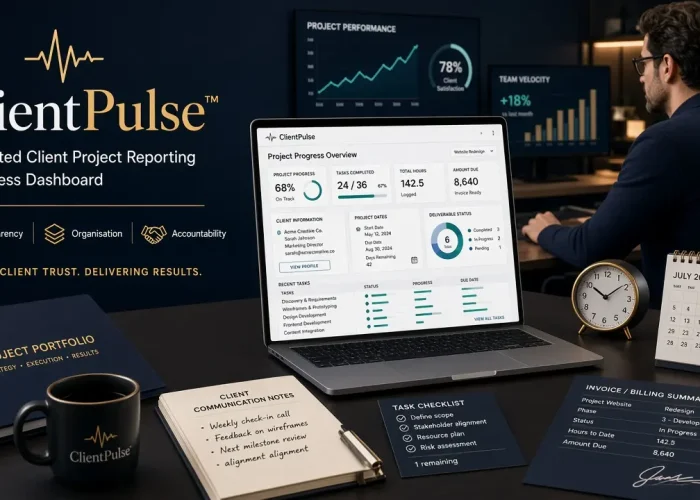
Stop rebuilding project reports from scratch. ClientPulse™ is an automated Excel client reporting system for freelancers, agencies and consultants. Manage clients, projects and tasks in one workbook.

Digital Download Productivity & Automation
Business Reporting & Automation SME Excel Instant Download

ClientPulse™ – Automated Client Project Reporting & Progress Dashboard

Turn Project Activity Into a Client-Ready Report—Without Rebuilding the Report Every Time

≈ $4.11
Buy now
KMACIMS Verified Business Resource Lifetime Access Premium Customer Support

Stop explaining project progress manually. Let the report show it.

Your client shouldn't have to ask:

"How far along are we?"

And you shouldn't have to spend 30 minutes rebuilding a progress report every time they ask.

With ClientPulse™, your project data is organised once, and the reporting dashboard pulls the relevant information together for the selected engagement.

Less reporting work. More professional client communication.

Most freelancers and small agencies do excellent work.
Then comes the administrative friction:

What has been completed?
What is still outstanding?
How many hours have been used?
What should the client be billed?
When did the project start and when is it expected to finish?
What exactly has been delivered?

ClientPulse™ answers all of these questions in one automated reporting workflow.
Instead of writing a new progress update every time a client asks “How far along are we?”, you organise your data once. Select a project number on the Report sheet, and the workbook automatically pulls the relevant client information, project details, task list, progress percentage, total hours and amount due into a clean, client-ready dashboard.
The Simple Workflow

Projects – Define the services you offer (Web Design, Data Analysis, Content Creation, Graphics Design, Research, etc. — fully renameable).
Clients – Store Client ID, name, location, contact person, email and industry.
ProjectInfo – Link each engagement to a client and record project name, start/end dates and hourly rate.
ProjectTasks – Break the work into individual deliverables with dates, hours worked and status (Completed / In-Progress / Not Started).
Report – Select the project number. The dashboard updates automatically.

What the Client Report Shows

Project progress percentage (based on completed vs total tasks)
Total hours worked
Amount due (Hours × Hourly Rate)
Client information (name, contact, location, email, industry)
Project details (name, dates, hourly rate)
Full list of deliverables with status, dates and hours

This turns vague updates such as “We’re about 60% done” into clear, professional communication:
Progress: 75%
Hours Worked: 53
Amount Due: ₦XXX
Completed: Domain & Hosting, WordPress Installation, Content, Testing
In Progress: —
Not Started: —
Expected End Date: [Date]
A Client Communication Tool, Not Just a Spreadsheet
ClientPulse™ is designed to improve transparency, professionalism and trust. It is ideal for anyone who manages multiple client engagements and wants a consistent, reusable reporting system without paying monthly fees for project-management software.
Built for Nigerian Freelancers & Service Businesses

Currency-ready structure
Fully editable and adaptable
No macros required for core functionality
Version 2.1 – August 2026

You organise the work once. ClientPulse™ generates the professional report every time.

  • Client Register Centralised, reusable client information
  • Project Catalogue Define and reuse your service types
  • Engagement TrackerConnect projects cleanly to clients
  • Task / Deliverable ManagerTrack individual pieces of work
  • Status TrackingCompleted / In-Progress / Not Started
  • Automatic Progress %Instant completion calculation
  • Hours TrackingTotal hours per engagement
  • Billing CalculationHours × Hourly Rate = Amount Due
  • Project SelectorSwitch between client reports in one click
  • Automated LookupsPulls all relevant data into the report automatically
  • Client DashboardProfessional, consolidated reporting view
  • Kmacims EAT-Verified Client Reporting System – Version 2.1 include the following:
  • Clear User Guide
  • Project Catalogue (service types)
  • Client Register
  • Project Information Manager
  • Project Task Tracker
  • Automated Client Reporting Dashboard
  • Automatic progress % calculation
  • Hours-worked calculation
  • Amount-due calculation (Hours × Rate)
  • Client & project information lookups
  • Deliverable/task status reporting
  • Project selector (switch reports instantly)
  • Automated report population
  • Currency-ready structure
  • Freelancers – Web designers, developers, writers, analysts, researchers, graphic designers and consultants managing multiple clients
  • Digital Agencies – Small teams that need consistent client reporting without separate spreadsheets for every project
  • Consultants – Provide structured progress and hours reporting that builds client confidence
  • Web Development Businesses – Track website projects from domain setup through deployment
  • Data Analysts & Researchers – Document assignments, hours and deliverables clearly
  • Creative Professionals – Manage graphics, content and design projects with transparent status updates
  • Small Service Businesses – Create a professional reporting process without expensive project-management software
  • Save significant time on reporting — no more rebuilding updates from scratch
  • Improve client transparency and trust with clear, data-backed progress reports
  • Link work performed directly to billing (hours × rate)
  • Manage multiple client engagements from a single workbook
  • Professionalise communication without learning new software
  • Create measurable accountability with task-level dates, hours and statuses
  • Affordable, one-time purchase alternative to monthly SaaS tools
💡